Dynamic wallpaper
A desktop that changes with your day.

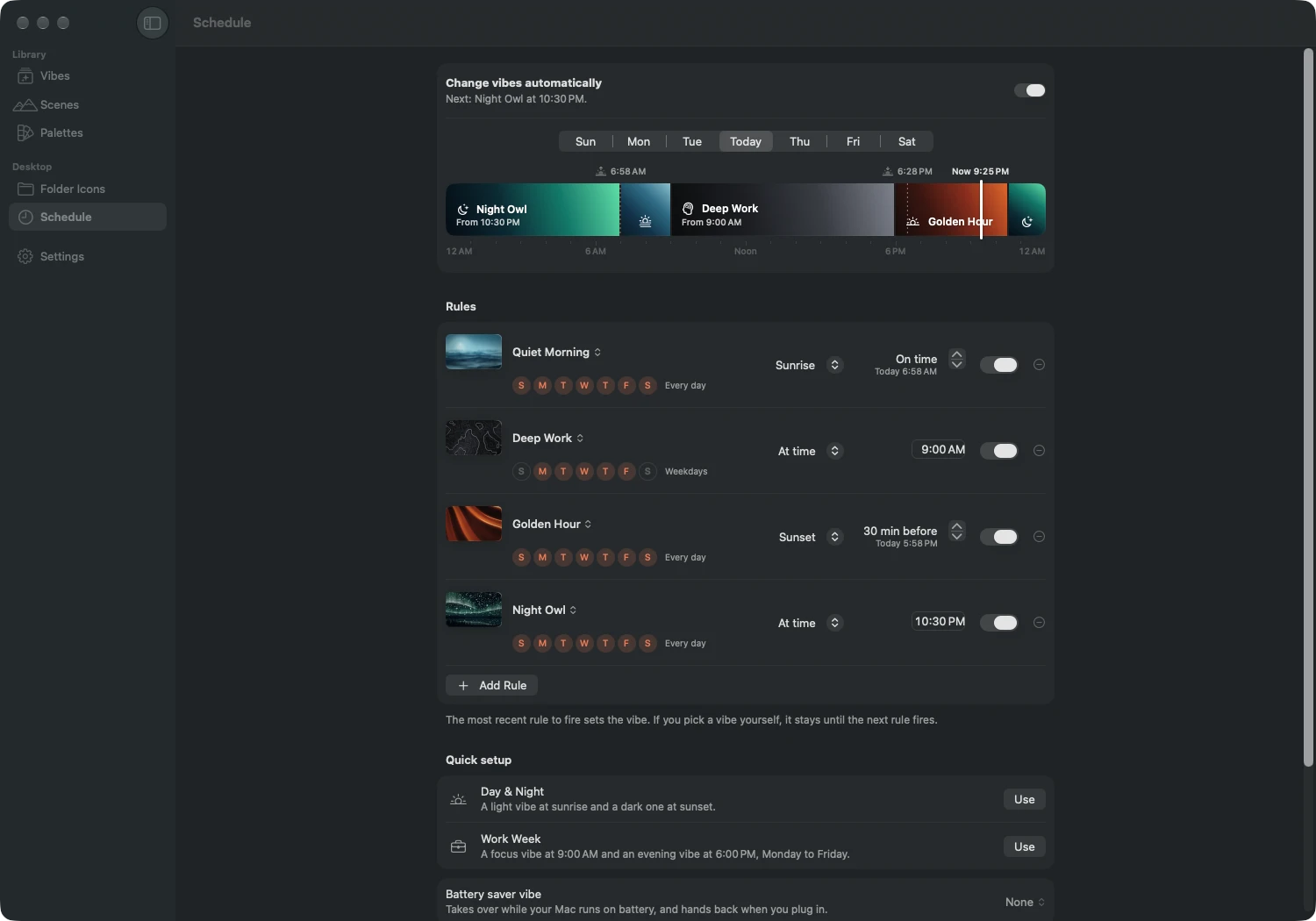
Rules, not a slideshow
Each rule picks a vibe and a moment:
- At a time, to the minute.
- At sunrise or sunset, or up to three hours before or after, in 15-minute steps.
- On the days you choose: every day, weekdays, weekends, or any mix.
The most recent rule to fire sets the vibe, the way a dynamic wallpaper moves through the day. A weekday rule at 9:00 holds until your sunset rule fires; on a Saturday, with no 9:00 rule, the evening vibe simply carries on.
Two quick setups get you started: Day & Night switches at sunrise and sunset, and Work Week switches at 9:00 and 18:00, Monday to Friday. A timeline shows how the day will go, for today or any other weekday.
Sunrise and sunset, worked out on your Mac
MacScapes calculates the sun’s times itself, using the same method as NOAA’s solar calculator, accurate to about a minute anywhere between 72° north and south. Each sun rule shows today’s actual time next to it.
It needs only a rough idea of where you are. Use your current location once, type a city, or let MacScapes estimate from your time zone. Nothing about your location is sent anywhere to work out the times. On days when the sun doesn’t rise or set, as in a polar summer, that rule sits the day out.
A battery vibe
With MacScapes Pro, the schedule can include a battery vibe: something calmer that takes over while your Mac runs on battery and hands back to the schedule when you plug in.
Separately, and by default, MacScapes caps itself at 30 frames per second and lowers its resolution whenever your Mac is unplugged or in Low Power Mode, and it stops drawing altogether when the desktop is covered or the display sleeps.
The lock screen keeps up
When a vibe changes, MacScapes can save a still of the new scene as your macOS desktop picture on each display, so the lock screen and Mission Control match the living wallpaper. Your own desktop picture is remembered first, and turning the option off puts it back.
Changes cross-fade over about a second and a half. From any app, ⌃⌥⌘→ and ⌃⌥⌘← step through your vibes, and the menu bar shows when the next scheduled change will happen.
How it differs from the built-in dynamic wallpapers
macOS includes a few dynamic pictures of its own that shift with the time of day. They’re a good start if you want one picture that darkens at night.
MacScapes changes the whole desktop instead, on rules you write: a different scene and palette for each part of the day, with widgets and ambient sound to match, and it works with every scene and your own photos.
Questions
Does it need my location?
No. Without one, MacScapes estimates sunrise and sunset from your time zone. For times that match your sky, share your approximate location once or type the name of a city. Sun times are worked out on your Mac, and Apple's location service turns the place into a name.
What happens if I pick a vibe myself?
It stays. Your choice holds until the next rule fires, then the schedule takes over again.
How many rules are free?
Two, which is enough for one vibe by day and another by night. MacScapes Pro adds as many rules as you like and the battery vibe.
Does the schedule work with more than one display?
Yes. A scheduled change reaches every display. With Pro, any display can keep a background of its own instead, while widgets and sound follow the active vibe.
Read next
- Desktop widgetsFourteen widgets that sit on your Mac's desktop and take their colors from the wallpaper behind them: clock, weather, calendar, focus timer and more.
- ScenesEvery scene in MacScapes: 42 animated wallpapers drawn live on your Mac, 9 Living Stills, and 48 palettes to recolor them.
- Folder iconsGive your Mac's folders patterned icons in your wallpaper's palette, or cut from a scene. Reset any of them in one click. Eight patterns are free.